







Google has added standard Shopping campaigns to Promotion Mode, the Google Ads setting that lowers a campaign’s Target ROAS for a short sale and then restores it automatically. Retailers can now schedule a sale’s lower target and extra daily budget in advance, instead of editing both by hand on the day.
Google’s Promotion Mode page in Google Ads Help now lists the feature as “Supported for standard Search, Shopping, and Performance Max campaigns.” Promotion Mode remains an open beta. Google has not announced the Shopping addition, and the page does not say when it was made.
From Search to Shopping
Google launched Promotion Mode in beta on 15 June, in an announcement on bidding that said: “This beta is available for Search and Performance Max campaigns.” Shopping was left out.
The same announcement opened the Smart Bidding Exploration beta to Shopping ads, in Shopping campaigns and in Performance Max campaigns with a product feed. Smart Bidding Exploration is the feature that lets bidding reach queries a campaign is not currently winning, and it is the mechanism Promotion Mode relies on to find extra traffic during a sale.
The German version of the help page shows the Shopping step was planned. It still lists only Search and Performance Max campaigns, but adds that the feature works on Search inventory at first and would reach retail in October 2026. Search Engine Journal, which spotted the English change on 27 November, reports that the French and Spanish pages also still list only Search and Performance Max.
The move extends a run of features Google has carried from Search into Shopping this year. In July, Google began expanding AI Max to Shopping campaigns, bringing its intent-based matching to product ads.
How a Promotion Window Works
An advertiser sets a promotion of 3 to 14 days, a Target ROAS tolerance between 5% and 90%, and, optionally, an extra daily budget. When the window closes, the campaign returns to its previous target and budget on its own.
Google’s own example is a five-day sale. A campaign that normally runs at a 500% Target ROAS and a $100 daily budget is given a 20% tolerance and an extra $50 a day, so it bids to a 400% target on $150 a day, then returns to 500% and $100 once the sale ends.
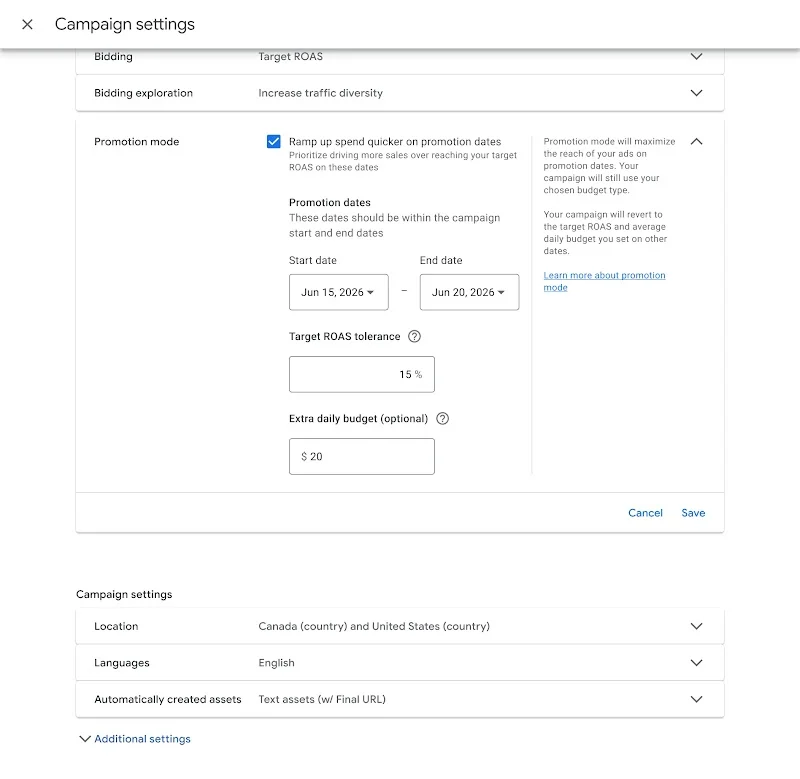
Tolerances also stack. If a campaign already runs Smart Bidding Exploration with its own tolerance, Google adds the two together, so 20% for the promotion and 20% for Exploration makes 40%.
What Retailers Need in Place
The campaign must use Target ROAS bidding set at campaign level. Promotion Mode does not work with portfolio bid strategies or shared budgets, and it is not supported on campaigns that have run past experiments.
Timing matters this close to the holiday peak. Google says new campaigns should be built at least 48 hours before the promotion starts, and existing ones should have run for at least one full conversion cycle on a daily budget first.
Once a promotion is live, its start date is fixed, though the end date can move within the 14-day limit. Target and budget changes have to be made inside the Promotion Mode settings, and switching the bid strategy type, for example to Maximize Conversion Value, turns Promotion Mode off.
Campaigns on a total budget can use the lower target but not the extra daily budget, so their total has to be raised by hand. After a sale, Google says bidding may need one to two conversion cycles to settle if targets or budgets moved substantially.
Recap
What is Promotion Mode in Google Ads?

Promotion Mode is a beta setting that lowers a campaign's Target ROAS, and optionally adds extra daily budget, for a promotion of 3 to 14 days. Google's help page now lists standard Search, Shopping and Performance Max campaigns as eligible.
How does Promotion Mode change a campaign's bidding?
The advertiser sets a tolerance between 5% and 90%, so a 500% Target ROAS with a 20% tolerance bids to 400% during the sale. Smart Bidding Exploration widens the queries it bids on, and both settings revert when the window ends.
What does Promotion Mode change for Shopping advertisers?
Retailers can schedule a sale's lower target and extra budget in advance instead of editing campaigns by hand. New campaigns should be built at least 48 hours before the sale starts.