


A marketing manager adds a reporting address, waits for the first feedback, and opens an attachment that looks like a wall of angle brackets. That file isn't a compliance chore. It's the first honest list of every system sending mail as the company's domain, including the tools nobody remembered buying.
Table of Contents
- What DMARC Reports Are and Why They Matter
- The Fields Worth Reading First
- Raw Results Versus the DMARC Verdict
What DMARC Reports Are and Why They Matter
Say a growth marketer publishes a DMARC record on Monday and checks the reporting mailbox on Wednesday. Inside sits a compressed attachment from a mailbox provider. Opened in a text editor, it's unreadable XML. Ignored, it's a missed audit.
Once a domain publishes a record with the rua tag, receiving systems send summaries back to that address. Each summary lists mail that claimed to come from the domain, the sources that sent it, and whether authentication passed. Think of DMARC reports as a bank statement for a domain. Every charge posted in the account holder's name appears, including charges that person never authorized. That is precisely what's needed to find forgotten vendors and spoofing.

The shared language behind those statements arrived when the Internet Engineering Task Force published RFC 7489 on March 18, 2015, giving domain owners one standard framework instead of provider specific feedback. Reports can show message volumes, sending IP addresses, SPF and DKIM outcomes, alignment failures, and policy disposition, so teams can spot legitimate third party senders, misconfigured systems, and unauthorized platforms.
The policy ladder makes that evidence actionable. p=none monitors without affecting delivery, p=quarantine treats failing mail as suspicious, and p=reject tells receivers to refuse unauthorized mail. Reports tell a team when it's safe to climb.
| Report type | Granularity | What it contains | Availability |
|---|---|---|---|
| Aggregate (rua) | Daily summary per sending source IP | Message counts, source IPs, SPF and DKIM results, alignment, policy disposition | Sent by participating receivers on a daily or more frequent schedule |
| Forensic (ruf) | Event-level, one record per failing message | Headers, subject lines, recipient addresses, sometimes body excerpts | Gmail and Microsoft 365 generally do not send them |
Starting with aggregate reports is advisable. Forensic reports address more specific questions and involve privacy considerations discussed later.
A DMARC report shows who is sending as your domain, not only who you meant to send.
Key Fields in an Aggregate Report
An aggregate report has three parts. The metadata block names the receiver that compiled it and the period it covers. The policy block repeats the DMARC record that receiver read. Then comes the useful part, one record per sending source, each with counts, authentication results, and the action applied.
New readers often start at the top and read down. That's slow. Start with count and source_ip together, because volume plus identity tells a marketer what's worth investigating first. A handful of messages from an unfamiliar source can wait a day. A large count from an address nobody recognizes cannot.
The Fields Worth Reading First
| Field | What It Contains | What to Check |
|---|---|---|
| report_metadata (org_name, report_id, date_range) | The receiver that sent the report, a unique ID and the begin and end time of the period | Confirm the period and use report_id to skip duplicates |
| policy_published (p, sp, pct, adkim, aspf) | The DMARC policy and alignment modes the receiver read at the time | Confirm p and pct match your current intent |
| record/row/source_ip | The IP address that sent the messages | Match each IP to a known sending service or flag it |
| row/count | Number of messages observed from that IP in the period | Compare against campaign send volumes to spot spikes |
| row/policy_evaluated/disposition | The action the receiver applied, none, quarantine or reject | Check that legitimate senders are not quarantined or rejected |
| row/policy_evaluated/dkim and spf | The DMARC result for each mechanism after alignment is applied | Look for aligned passes on every legitimate sender |
| auth_results/dkim (domain, selector, result) | The raw DKIM verification and the signing domain | Confirm the d= domain is one you control or a vendor you use |
| auth_results/spf (domain, scope, result) | The raw SPF check and the domain that was evaluated | Confirm the domain matches the return-path your vendor uses |
| identifiers/header_from | The domain shown in the visible From address | Compare against the aligned domain for each sender |
Three checks save the most confusion. First, report_id is the deduplication key, since the same report can arrive twice and double the apparent volume. Second, date_range normally spans a day, so a campaign sent late at night may split across two reports. Third, policy_published shows what the receiver read, including p, sp, pct, adkim and aspf, which may lag behind a DNS edit a team made that morning.
Raw Results Versus the DMARC Verdict
The most misread distinction sits between auth_results and policy_evaluated. Auth_results records the raw SPF and DKIM checks. Policy_evaluated records what DMARC decided after applying alignment. A raw pass in the first block can still become a fail in the second, and that second verdict is the one that drives disposition.
A healthy record is boring. It shows a known sending source, a count that matches a real campaign or automated flow, and at least one aligned pass. Anything else deserves a label and an owner.
How SPF, DKIM and Alignment Appear in Reports
Take a weekly newsletter sent through an email service provider. The visible From address uses the brand's domain. Behind the scenes, two separate checks run before DMARC reaches a verdict, and the report records both.
SPF checks whether the sending server is authorized for the domain in the envelope return path. It answers a narrow question about the sending source, not about the brand the reader sees. DKIM checks a cryptographic signature against the signing domain in the d= tag. It answers whether the message was signed by whoever controls that domain and whether signed content stayed intact.
DMARC then asks a different question. Did at least one of those checks pass, and does the passing domain align with the visible From domain? Under relaxed alignment, a subdomain counts as aligned with its organizational domain, so a vendor sending from a dedicated subdomain can still pass. Under strict alignment, the domains must match exactly, and subdomains don't count.
The Four Outcomes a Marketer Will See
- SPF passes and aligns: The return path domain matches the From domain closely enough, so DMARC passes on SPF alone.
- DKIM passes and aligns: The vendor signs with the brand's domain, so DMARC passes even if SPF doesn't align.
- Both pass and align: The strongest position, and the one that survives forwarding and vendor changes best.
- Neither aligns: DMARC fails regardless of any raw pass, and disposition follows the published policy.
That last case causes the most arguments. A report can show SPF pass in the raw results while DMARC fails, because the return path belongs to the vendor's own domain rather than the brand's. The check passed. The identity didn't match. The fix isn't more SPF entries, it's getting the vendor to sign DKIM with the customer's domain or to use a custom return path.
One scope detail matters for interpretation. Aggregate reports are machine readable XML documents sent normally on a daily or more frequent schedule, and their counts cover all messages observed, including messages ultimately blocked by other filtering systems, according to RFC 7489 on the IETF Datatracker. So the numbers measure authentication coverage, not inbox placement. A team shouldn't compare report counts directly against opens or delivered counts from a sending platform and expect them to match.
Turning Raw Aggregate Reports Into Plain Findings With Suped
Reading raw XML works for one domain and one curious afternoon. It stops working when reports arrive daily from multiple receivers and someone has to reconcile them against the team's real sender list. That reconciliation is the actual job. An aggregate report is an inventory of everything claiming to send as your domain, and a dashboard only earns its keep if it matches every entry in that inventory to a named owner. Suped is a platform for email authentication, domain security, and deliverability that parses those files into sender level findings, then connects each finding to a configuration fix. The workflow looks like this.
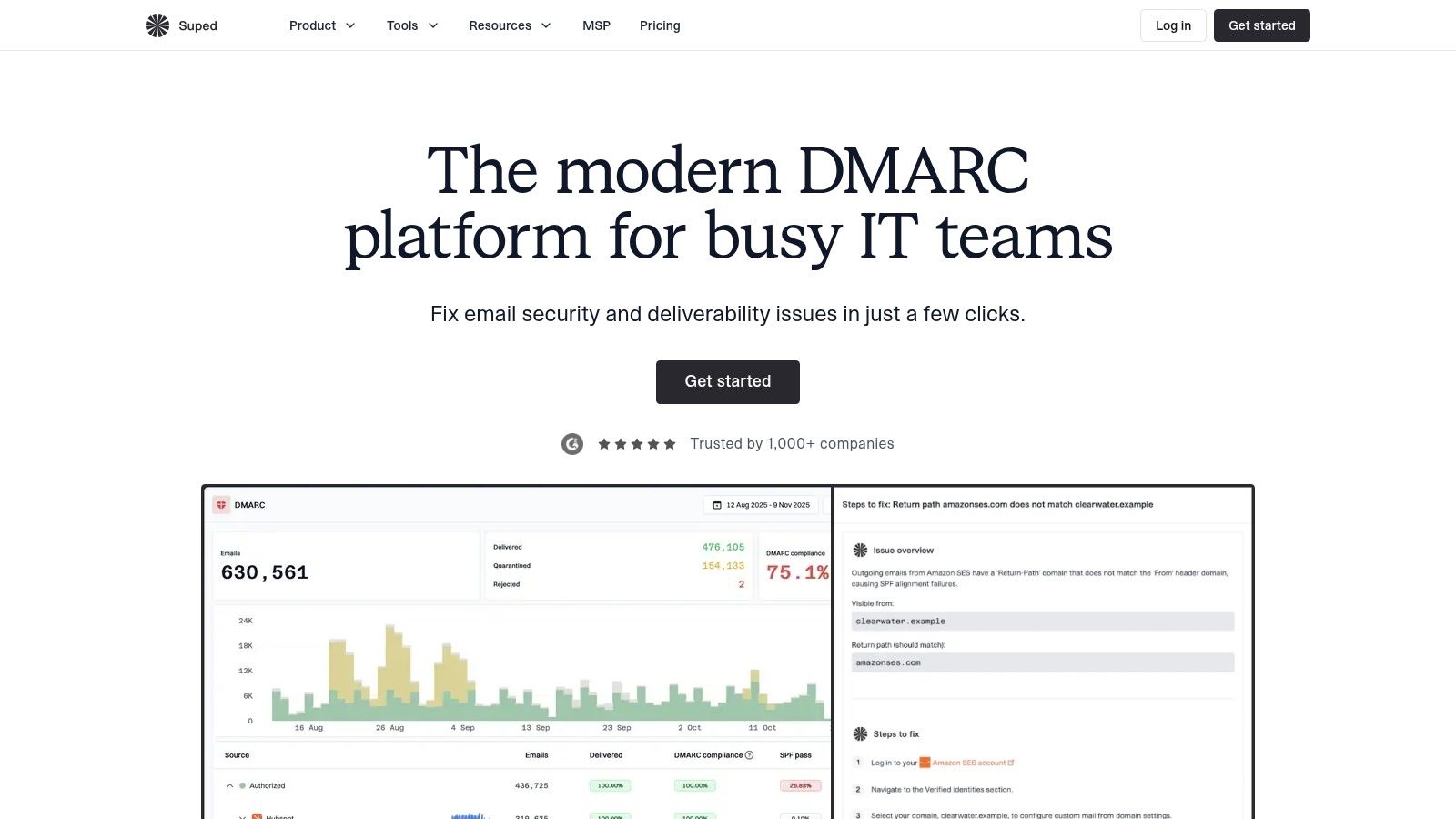
- Point the rua address at the platform: Ingestion replaces mailbox archaeology, so no report gets lost in spam or a full inbox. The common mistake is leaving an old personal address in the record alongside the new one, which splits the inventory across two destinations.
- Review categorized sending sources: DMARC monitoring groups traffic by sender and shows authentication results, compliance metrics, and trends, so an unknown source stands out by name rather than as a bare IP. Reviewing totals instead of individual sources hides problems, since a domain-wide pass rate can look healthy while one failing sender sits underneath it.
- Act on the recommendation attached to each failure: Guided remediation ties a failing sender to the specific record change it needs, which shortens the loop between finding and fix. Skipping the retest is where teams fool themselves, because a quiet dashboard can mean a receiver stopped reporting. A retest is the only proof the change held.
- Move records to hosted management where manual DNS keeps breaking: Hosted DMARC, SPF, DKIM, and MTA-STS centralize changes, and SPF flattening addresses the lookup limit that often invalidates long records. The hidden problem is usually a record nobody has touched since a vendor migration.
- Turn on alerts for new senders and authentication declines: Email and webhook notifications catch a surprise source early, before the monthly review. Route them to a person who can act, because alerts sent to an unmonitored group address catch nothing.
Suped also covers blocklist, reputation, and lookalike domain monitoring, plus BIMI setup and hosting. It offers a free tier alongside paid plans, so check its current pricing against your domain count and retention needs before committing. A multi tenant dashboard suits managed service providers running many client domains, while free diagnostic tools, including a DMARC XML analyzer and domain health checks, suit a team validating a single fix.
One caution applies to any tool in this category, and I'd take it seriously. A clean dashboard confirms the senders the parser can see. It says nothing about traffic no receiver reported, or about a parked domain that still lacks a rua address. Treat the tool as the front end for your sender inventory, and audit that inventory itself on a schedule.
How to Read a Report Step by Step
A disciplined first pass takes under an hour and prevents weeks of guessing. The sequence below works in a spreadsheet, a parser, or a dashboard, because the logic doesn't change with the tool.
The infographic below condenses the pass into its core moves.

- Decompress and store the raw file: Unpack the attachment, keep the original XML untouched, and use report_id to skip repeats, because duplicates inflate volume and distort pass rates.
- Confirm the period and policy: Check date_range and policy_published so every verdict is judged against the p and pct values in force, not the values someone intended to publish.
- Sort by count, highest first: List the top sources by volume before looking at pass rates, since a large failing source matters more than a tiny perfect one.
- Map each source to an owner: Label every entry as the email platform, CRM, transactional sender, billing system, support tool, or unknown, and write down the person who owns that relationship.
- Check alignment for each known sender: Confirm DKIM or SPF passes and aligns for every legitimate service, and note which mechanism carries each sender.
- Check dispositions: Any quarantine or reject applied to a legitimate sender means that sender gets fixed before enforcement tightens, no exceptions.
- Investigate the unknowns: Record each unidentified source's volume and failure pattern, then decide whether it's spoofing, a forgotten tool, or forwarding noise.
- Log pass rates by sender weekly: A trend line per sender exposes slow degradation that a single day's report hides.
Sorting rule: Sort by volume first and pass rate second. Reversing that order hides a large unauthorized sender behind a small healthy one.
By the end of one pass, every source should sit in one of three buckets, known and aligned, known and broken, or unknown. Work moves fastest when the known and broken bucket gets fixed first, because those senders have owners who can act today. Unknowns get monitored by volume while that work proceeds.
Common Findings and What Causes Them
Say a retailer switches email platforms on a Friday. By the following week, order confirmations start failing DMARC from an unfamiliar sending range, while the newsletter still passes. Nothing about the brand changed. The new platform wasn't signing with the retailer's domain yet, and the reports show it before customers complain.
Most findings repeat across companies. The patterns below cover the ones marketing teams hit first.
| Finding in the Report | Likely Cause | Fix |
|---|---|---|
| Unknown IP with high volume, SPF and DKIM both fail | Spoofing or an undocumented third-party sender | Identify the owner; if none, keep quarantine or reject and block the source |
| Known vendor passes SPF but fails DMARC | Return-path belongs to the vendor, so SPF does not align with the From domain | Set up a custom DKIM domain so the vendor signs as your domain |
| Known vendor passes DKIM but fails DMARC | The signing domain is the vendor's own domain, not yours | Configure the vendor to sign with your domain and confirm the d= value |
| Forwarded mail fails SPF but passes DKIM | Forwarding changes the sending IP, so SPF no longer matches | Rely on aligned DKIM for forwarded mail; monitor whether the forwarder preserves the signature |
| Sudden drop in reported volume with no change in sends | Reporting transport, mailbox ingestion or parser problem | Check the reporting mailbox and compare reported volume with your send logs |
| Legitimate mail rejected after moving to p=reject | A real sender was not aligned before enforcement | Return the policy to p=quarantine, fix the sender, then ramp back up |
Fixes That Take a Day Versus Fixes That Take Weeks
Timing depends on who controls the broken piece. Correcting a reporting address, fixing a typo in a record the team owns, or removing a dead vendor's entry takes a day, plus DNS propagation. Those are same week wins and shouldn't queue behind bigger projects.
Vendor side changes run slower. Getting a platform to sign DKIM with a customer's domain usually means a support ticket, a settings change in the vendor console, new DNS records, and a verification round. Procurement managed tools can add an approval step nobody budgeted for. Planning enforcement dates around the slowest vendor prevents the embarrassing rollback in the last table row.
Forwarding deserves separate treatment because it isn't anyone's misconfiguration. When a recipient's server forwards a message, the sending source changes, so SPF breaks through no fault of the original sender. DKIM often survives because the signed content travels with the message, provided the forwarder doesn't rewrite the body or headers. That's the practical argument for getting both mechanisms aligned on every important stream. One mechanism covers the paths where the other predictably fails.
One caution overrides the urge to tidy up. A high volume source failing both SPF and DKIM is a spoofing candidate until someone proves otherwise. It should never be added to an allowlist or included in an SPF record just to make the red numbers disappear. No owner, no trust.
Forensic Reports and the Privacy Trade-Off
Most marketing teams shouldn't enable forensic reporting by default. That position surprises people, because setup guides often present ruf as the natural companion to rua. The two report types carry very different obligations, and the forensic one frequently delivers less than expected.
A forensic report is generated per failing message and can include headers, subject lines, recipient addresses, and sometimes body excerpts, which makes it personal data in most jurisdictions. Gmail and Microsoft 365 generally do not send them, since providers weigh diagnostic value against exposing user data. A team can publish a ruf address, accept the legal exposure, and still receive nothing from the largest receivers in its audience.
Volume compounds the problem. Aggregate reports summarize a period into counts. Forensic reports arrive event by event, so an active spoofing run or a broken vendor can generate a flood of individual records, each one containing data that needs controlled storage.
When Forensic Reporting Earns Its Cost
Enable it only when all of these hold. There's a specific diagnostic question aggregate data cannot answer, such as which subject line a failing stream carries. The reporting address is narrowly scoped and separate from general mailboxes. A named person owns the data, access is limited to people who need it, and a short retention period is enforced rather than intended.
Before accepting those costs, exhaust the alternatives. Sender side logs from the email platform usually identify which stream failed. Seed testing with controlled mailboxes reproduces the failure without touching real recipients' data. Provider delivery diagnostics often pinpoint the rejecting rule. If none of those answer the question, forensic reporting has a case. Until then, it's liability in search of a purpose.
Monitoring Routine and Go or Wait Checks
Reports only protect a domain when someone reconciles them against reality on a schedule. The practice that makes that work is a sender inventory: a living list of every tool that sends as the domain, with its owner, purpose, and expected monthly volume. Every new vendor, automation, or agency tool goes on the list before it launches. A sender that first appears inside a report is already a problem.
The Monthly Reconciliation
Each month, compare reported volume against send counts from the email platform, CRM, and transactional systems. The totals will not match exactly, because reporting coverage differs by receiver, but the relationship should stay stable. A gap that widens month over month means missing reports, unaccounted traffic, or a sender nobody logged.
Track pass rate by sender alongside volume. When a legitimate sender falls below the team's target alignment rate, it gets a named owner and a fix date in the same meeting. Findings without owners become permanent fixtures.
That discipline matters because DMARC reports are not a complete census. The IETF aggregate reporting draft describes receivers generating reports after discovering a domain's rua request, without guaranteeing universal participation or identical behavior across providers. Participation varies, and a clean dashboard can still be missing traffic from receivers that send nothing at all. Reported volume should always be checked against outbound logs, campaign counts, and bounce data before it gets treated as the whole picture.
A dashboard shows observed traffic, not total traffic. Confidence comes from reconciliation, not from a green chart.
History shows why the staged approach works. A July 15, 2018 assessment of 1,144 federal domains, conducted after Binding Operational Directive 18-01, found 81% had implemented DMARC while 52% had reached p=reject. Agencies used reports to find legitimate senders and fix alignment before tightening policy, which is the same sequence a marketing team should follow at smaller scale.
The Five Part Go or Wait Check
Move to p=quarantine at a partial percentage only when every condition below holds. Ramp the percentage up while watching dispositions, then move to p=reject.
- Reports have arrived consistently for several weeks: Gaps in reporting mean blind spots, and enforcement during a blind spot is gambling.
- Reported volume reconciles with send logs: The gap stays within a tolerance the team set in advance, so observed traffic plausibly represents real traffic.
- Every legitimate sender shows aligned passes: Each entry in the sender inventory passes on DKIM, SPF, or both, with alignment.
- No legitimate sender is being quarantined or rejected: Current dispositions prove enforcement will not break real mail on day one.
- Every unknown source is identified or treated as hostile: Nothing high volume remains unexplained.
If any condition fails, the answer is wait. Fix the gap, rerun the check, and let the vendor with the longest lead time set the enforcement date. Rushing to reject to hit a compliance deadline, then rolling back after invoices bounce, costs more credibility than a deliberate delay.
The action for this week does not require new tooling. Build the sender inventory from the last set of reports, assign an owner to every row, and reconcile one month of reported volume against send logs from the main platforms. That single exercise usually surfaces one forgotten tool, one broken signature, and the distance between the domain and enforcement.
Build that sender inventory this week, then keep current on the platform and policy changes that affect sending programs with The Keyword. Its 100% free newsletter is a bitesized update sent every Wednesday to over 200,000 marketers, and subscribers can unsubscribe at any time.